Amazon Coupons
Vipon > V Show > The Future of Content Creation: Plus AI for Google Slides & Docs Share great deals & products and save together.

The Future of Content Creation: Plus AI for Google Slides & Docs

2025-03-18 23:44:49
Report

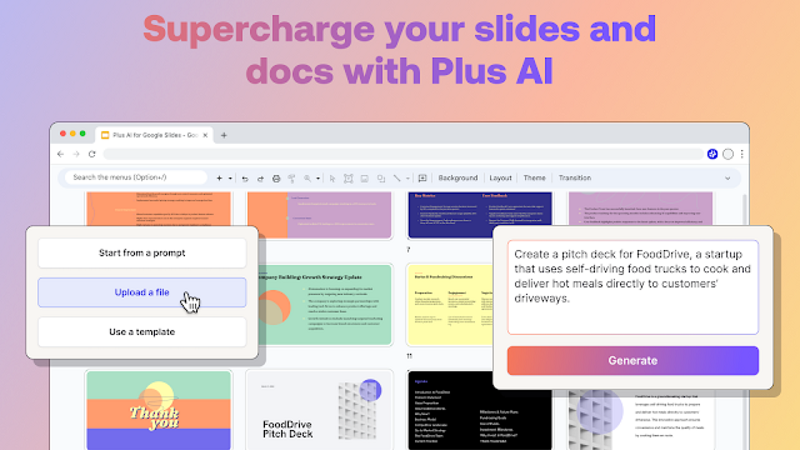
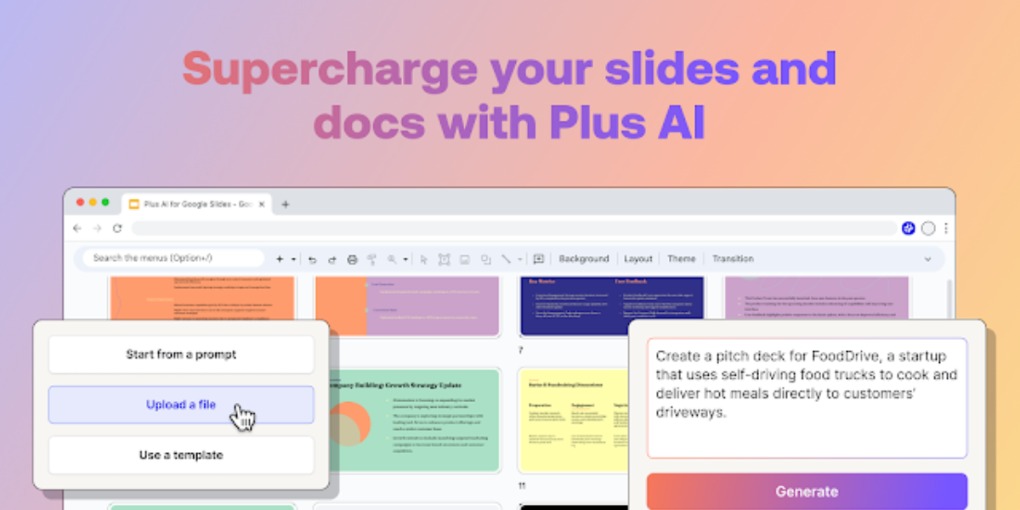
Whether you are in school, working as a professional, or a business owner, being good and creating content should be an important skill. Some tools like Google Slides and Docs are popular among many for writing, making presentations, and much more. People use these to make their ideas more presentable and professional in formal settings. However, recently, new technology like AI has improved the means to offer more and better services to millions worldwide. This addition of AI in Google Slides and Docs has resulted in considerable new features, making it easier and faster to create content by assisting with writing, design, and collaboration. Today, we will explore how Plus AI enhanced these tools and how they can be helpful in various ways. 


What is AI, and How Does It Help in Content Innovation?


Before we learn the role of plus AI in these implements, you should know exactly what AI is and how it helps make content.


In simple words, AI is a technology that allows computer systems to learn and complete tasks requiring human knowledge. This can include conducting tasks like understanding language, recognizing patterns, and making data-based judgments. When this technology is integrated in Google Slides or Docs, it can analyze your content and help by making suggestions, assist in writing, and even automate some tasks to save time and effort. 


Features of Plus AI For Google Slides and Docs


Now let's take a look at some creative ways in which plus AI can be a great addition to these popular tools: 


  • Writing Assistance


The biggest issue most people face when writing content is not knowing how to start. Writing is not an easy job, especially when it comes to essays, articles, or reports. With Plus AI you can solve this case and present industry level content without much struggle. In Docs, it can help generate ideas or entire paragraphs based on a few simple prompts. For example, if you need to write a blog within a deadline and don’t know how to structure it, you can ask Plus AI, which will provide an outline. This way you can save yourself from the pressure and prepare good quality content without being overwhelmed. 


Even with Google Slides, you can do much more easily and effectively. You can generate the whole text from AI and simply add it to your slides. You can even set the tone by giving the AI the proper commands. This is a great feature for people who need to make presentations and ensure that all the important topics are covered while maintaining a flow. 


  • Grammar and Style Improvements


Another area where AI can help is by improving your writing and content. Making errors in spellings and grammar can lead to a bad impression, particularly in professional settings. While the docs already have a feature that checks errors, it sometimes misses. With Plus AI the tool becomes even smarter. It can help by recommending changes that will make your text more perfect by reducing mistakes and making it more polished. 


Moreover, it can also help set a tone and technique according to the topic and your needs. For example, if you are writing a report, then it should be in a formal manner. If you’re writing an informal blog post, it can help make the text sound friendly and engaging. You can save time by making it more precise and practical. 


In slides, you set the tone based on your target audience and preferences. Whether you are presenting in front of the directors or a bunch of colleagues, it ensures that the message is transmitted in the best way possible. 


  • Design Suggestions for Presentations


Making a good PPT can be challenging for most people, especially when you are not familiar with the basic principles of designing. Plus, AI can be very helpful in this area. It can suggest a new layout or formats that align with your slogan or the intent. It can also change fonts, colors, and backgrounds to make the presentation visually appealing. 


For example, let's say you are making a PPT for a new product, plus AI can suggest some changes that will highlight the key features. This will ensure your PPT is not only presentable but also displays the message. 


How Plus AI Will Shape the Future of Content Creation


While Plus AI has proven to be a useful integration in these tools, that is not it with the increasing use of Artificial Intelligence, we can expect more such creations that will help content creators significantly. 


  • Personalized Content Creation: AI will be more understanding and will learn your writing patterns and preferences, making it a more seamless integration. Its suggestions will fit your tone and style more effortlessly. 


  • Smarter and More Efficient Collaboration: It will make collaborating much easier as more different people start using it. AI will analyze the past projects and will make suggestions that would help making better decisions and effective teamwork. Instead of sending hours making changes and setting the tone, it can give you instant feedback, ensuring that everyone is on the same page. 


  • Greater Creativity and Innovation: AI is not just for basic tasks, it can do so much more by helping your creativity come to life. If you are not able to find any inspiration and are stuck at some point, it can help by showing new angles and ideas you might have missed. Moreover, AI could help you discover new ways to present information. 


Conclusion 

Combining Plus AI with Google Slides and Docs can be very valuable. It can improve your productivity and imagination. Automated content creation, improved collaboration, data analysis, design changes, streamlining workflows, and enriched availability transform how you work with these basic tools. Whether you are preparing a PowerPoint, drafting a report, or teaming on a project, it encourages you to unlock the full potential of these apps. The official Plus website provides more information and tips on using Plus AI.

The Future of Content Creation: Plus AI for Google Slides & Docs

802.2k
2025-03-18 23:44:49

Whether you are in school, working as a professional, or a business owner, being good and creating content should be an important skill. Some tools like Google Slides and Docs are popular among many for writing, making presentations, and much more. People use these to make their ideas more presentable and professional in formal settings. However, recently, new technology like AI has improved the means to offer more and better services to millions worldwide. This addition of AI in Google Slides and Docs has resulted in considerable new features, making it easier and faster to create content by assisting with writing, design, and collaboration. Today, we will explore how Plus AI enhanced these tools and how they can be helpful in various ways. 


What is AI, and How Does It Help in Content Innovation?


Before we learn the role of plus AI in these implements, you should know exactly what AI is and how it helps make content.


In simple words, AI is a technology that allows computer systems to learn and complete tasks requiring human knowledge. This can include conducting tasks like understanding language, recognizing patterns, and making data-based judgments. When this technology is integrated in Google Slides or Docs, it can analyze your content and help by making suggestions, assist in writing, and even automate some tasks to save time and effort. 


Features of Plus AI For Google Slides and Docs


Now let's take a look at some creative ways in which plus AI can be a great addition to these popular tools: 


  • Writing Assistance


The biggest issue most people face when writing content is not knowing how to start. Writing is not an easy job, especially when it comes to essays, articles, or reports. With Plus AI you can solve this case and present industry level content without much struggle. In Docs, it can help generate ideas or entire paragraphs based on a few simple prompts. For example, if you need to write a blog within a deadline and don’t know how to structure it, you can ask Plus AI, which will provide an outline. This way you can save yourself from the pressure and prepare good quality content without being overwhelmed. 


Even with Google Slides, you can do much more easily and effectively. You can generate the whole text from AI and simply add it to your slides. You can even set the tone by giving the AI the proper commands. This is a great feature for people who need to make presentations and ensure that all the important topics are covered while maintaining a flow. 


  • Grammar and Style Improvements


Another area where AI can help is by improving your writing and content. Making errors in spellings and grammar can lead to a bad impression, particularly in professional settings. While the docs already have a feature that checks errors, it sometimes misses. With Plus AI the tool becomes even smarter. It can help by recommending changes that will make your text more perfect by reducing mistakes and making it more polished. 


Moreover, it can also help set a tone and technique according to the topic and your needs. For example, if you are writing a report, then it should be in a formal manner. If you’re writing an informal blog post, it can help make the text sound friendly and engaging. You can save time by making it more precise and practical. 


In slides, you set the tone based on your target audience and preferences. Whether you are presenting in front of the directors or a bunch of colleagues, it ensures that the message is transmitted in the best way possible. 


  • Design Suggestions for Presentations


Making a good PPT can be challenging for most people, especially when you are not familiar with the basic principles of designing. Plus, AI can be very helpful in this area. It can suggest a new layout or formats that align with your slogan or the intent. It can also change fonts, colors, and backgrounds to make the presentation visually appealing. 


For example, let's say you are making a PPT for a new product, plus AI can suggest some changes that will highlight the key features. This will ensure your PPT is not only presentable but also displays the message. 


How Plus AI Will Shape the Future of Content Creation


While Plus AI has proven to be a useful integration in these tools, that is not it with the increasing use of Artificial Intelligence, we can expect more such creations that will help content creators significantly. 


  • Personalized Content Creation: AI will be more understanding and will learn your writing patterns and preferences, making it a more seamless integration. Its suggestions will fit your tone and style more effortlessly. 


  • Smarter and More Efficient Collaboration: It will make collaborating much easier as more different people start using it. AI will analyze the past projects and will make suggestions that would help making better decisions and effective teamwork. Instead of sending hours making changes and setting the tone, it can give you instant feedback, ensuring that everyone is on the same page. 


  • Greater Creativity and Innovation: AI is not just for basic tasks, it can do so much more by helping your creativity come to life. If you are not able to find any inspiration and are stuck at some point, it can help by showing new angles and ideas you might have missed. Moreover, AI could help you discover new ways to present information. 


Conclusion 

Combining Plus AI with Google Slides and Docs can be very valuable. It can improve your productivity and imagination. Automated content creation, improved collaboration, data analysis, design changes, streamlining workflows, and enriched availability transform how you work with these basic tools. Whether you are preparing a PowerPoint, drafting a report, or teaming on a project, it encourages you to unlock the full potential of these apps. The official Plus website provides more information and tips on using Plus AI.

Comments

Recommended

How Plus AI Transforms Google Slides into a Smart Presentation Tool
VIPON_701732510589
1190.1k
Plus AI: The Ultimate Tool for Smarter Google Workspace Collaboration
VIPON_701732510589
169.8k
Why Plus AI is a Must-Have Tool for Google Slides Users
VIPON_701732510589
3119.1k
Download Vipon App to get great deals now!
...
Amazon Coupons Loading…